> ## Documentation Index
> Fetch the complete documentation index at: https://docs.outband.ai/llms.txt
> Use this file to discover all available pages before exploring further.
# Billing & Subscription
> How Outband's pricing plans work, how to upgrade, and how to manage your subscription.
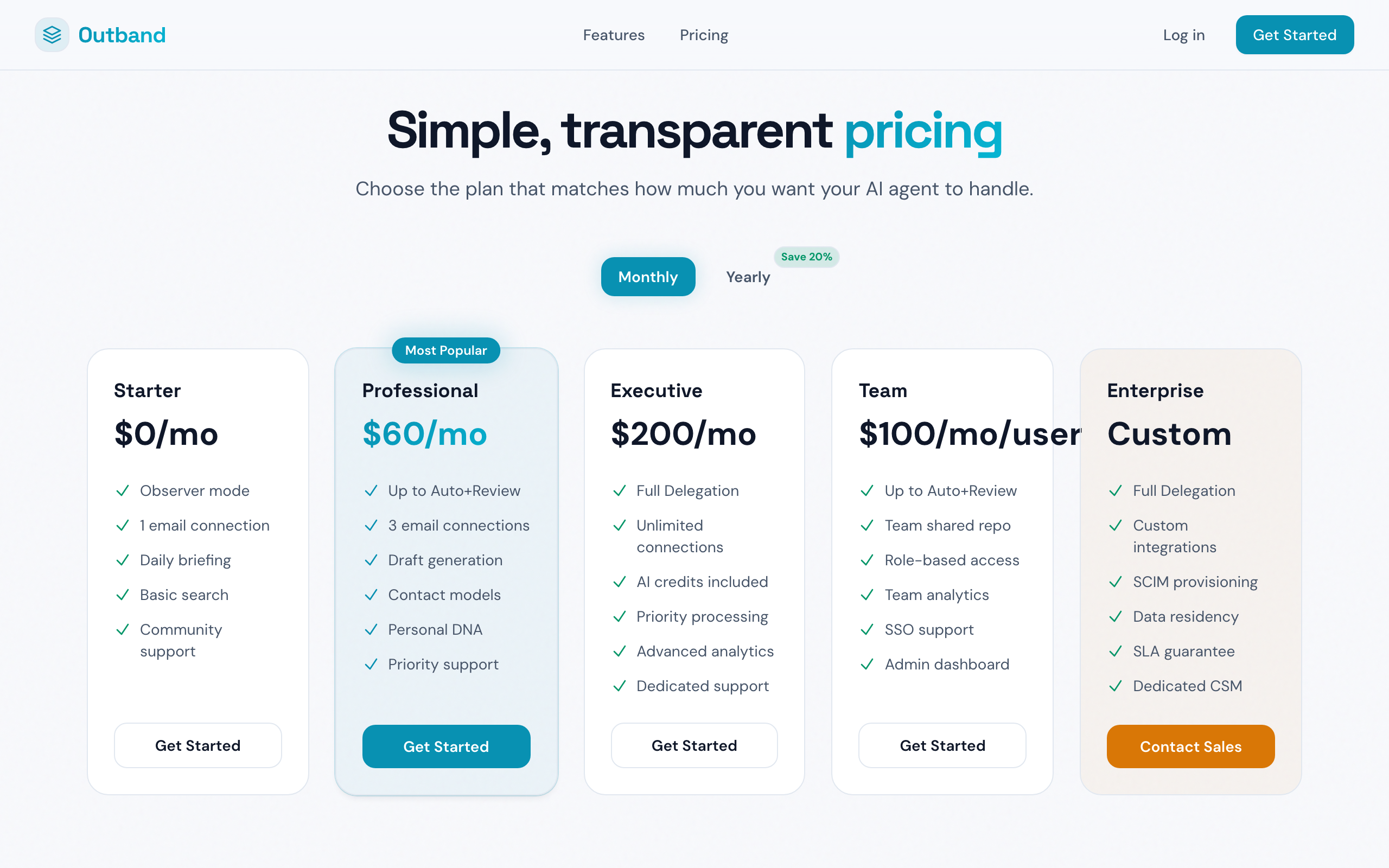
Outband offers five pricing tiers, each unlocking more AI capabilities.
 ## Plans Overview
| Plan | Price | Key features |
| ---------------- | -------------------- | ---------------------------------------------------------------------------------------------- |
| **Starter** | Free | Daily Briefing, AI categorization, Observer mode, Sonnet-class AI |
| **Professional** | \$60/month | Everything in Starter + Drafter mode, Auto+Review mode, Perception Preview, Opus-class AI |
| **Team** | \$100/month per user | Everything in Professional + shared policies, Team Repo, team analytics, multi-user management |
| **Executive** | \$200/month | Everything in Professional + Full Delegation mode, priority AI processing |
| **Enterprise** | Custom pricing | Everything in Team + SSO/SAML/SCIM, data residency, audit logs, dedicated support |
## What Each Trust Level Requires
| Trust Level | Minimum Plan |
| --------------- | -------------- |
| Observer | Starter (free) |
| Drafter | Professional |
| Auto+Review | Professional |
| Full Delegation | Executive |
## AI Model Quality
Your plan determines which AI model Outband uses:
* **Starter (free)** -- Sonnet-class AI. Good for summaries and categorization, but drafts are not available.
* **Professional and above** -- Opus-class AI. The most capable model for drafting, perception prediction, and complex analysis.
When evaluating whether to upgrade, notice the quality difference in your briefing summaries. Opus-class provides significantly more nuanced analysis, especially for complex multi-party threads.
## Upgrading Your Plan
1. Go to **Settings > Billing & Subscription**
2. Select **Upgrade** next to the plan you want
3. Enter your payment details (handled securely by Stripe)
4. Your upgrade takes effect immediately -- new features are available right away
## Downgrading
1. Go to **Settings > Billing & Subscription**
2. Select **Change Plan**
3. Choose a lower-tier plan
4. Your downgrade takes effect at the end of your current billing period
5. Features from the higher plan remain active until the period ends
Downgrading from Professional to Starter will disable draft generation and Perception Preview. Existing drafts will be retained but no new drafts will be generated.
## Managing Payment
* **Payment method** -- Update your credit card from **Settings > Billing & Subscription > Payment Method**
* **Invoices** -- View and download past invoices from the billing page
* **Billing cycle** -- Monthly billing, charged on the same date each month
## Referral Program
Earn credits by inviting others to Outband:
1. Go to **Settings > Billing & Subscription**
2. Find your referral link in the **Referral** section
3. Share your link with colleagues
4. When someone signs up and subscribes using your link, you both receive a credit
## Cancellation
You can cancel your subscription at any time:
1. Go to **Settings > Billing & Subscription**
2. Select **Cancel Subscription**
3. Your account reverts to the free Starter plan at the end of the billing period
4. Your data is retained -- you can resubscribe at any time without losing your Contact Models or history
## Next Steps
Understand what each trust level enables.
Learn about team and enterprise plans.
## Plans Overview
| Plan | Price | Key features |
| ---------------- | -------------------- | ---------------------------------------------------------------------------------------------- |
| **Starter** | Free | Daily Briefing, AI categorization, Observer mode, Sonnet-class AI |
| **Professional** | \$60/month | Everything in Starter + Drafter mode, Auto+Review mode, Perception Preview, Opus-class AI |
| **Team** | \$100/month per user | Everything in Professional + shared policies, Team Repo, team analytics, multi-user management |
| **Executive** | \$200/month | Everything in Professional + Full Delegation mode, priority AI processing |
| **Enterprise** | Custom pricing | Everything in Team + SSO/SAML/SCIM, data residency, audit logs, dedicated support |
## What Each Trust Level Requires
| Trust Level | Minimum Plan |
| --------------- | -------------- |
| Observer | Starter (free) |
| Drafter | Professional |
| Auto+Review | Professional |
| Full Delegation | Executive |
## AI Model Quality
Your plan determines which AI model Outband uses:
* **Starter (free)** -- Sonnet-class AI. Good for summaries and categorization, but drafts are not available.
* **Professional and above** -- Opus-class AI. The most capable model for drafting, perception prediction, and complex analysis.
When evaluating whether to upgrade, notice the quality difference in your briefing summaries. Opus-class provides significantly more nuanced analysis, especially for complex multi-party threads.
## Upgrading Your Plan
1. Go to **Settings > Billing & Subscription**
2. Select **Upgrade** next to the plan you want
3. Enter your payment details (handled securely by Stripe)
4. Your upgrade takes effect immediately -- new features are available right away
## Downgrading
1. Go to **Settings > Billing & Subscription**
2. Select **Change Plan**
3. Choose a lower-tier plan
4. Your downgrade takes effect at the end of your current billing period
5. Features from the higher plan remain active until the period ends
Downgrading from Professional to Starter will disable draft generation and Perception Preview. Existing drafts will be retained but no new drafts will be generated.
## Managing Payment
* **Payment method** -- Update your credit card from **Settings > Billing & Subscription > Payment Method**
* **Invoices** -- View and download past invoices from the billing page
* **Billing cycle** -- Monthly billing, charged on the same date each month
## Referral Program
Earn credits by inviting others to Outband:
1. Go to **Settings > Billing & Subscription**
2. Find your referral link in the **Referral** section
3. Share your link with colleagues
4. When someone signs up and subscribes using your link, you both receive a credit
## Cancellation
You can cancel your subscription at any time:
1. Go to **Settings > Billing & Subscription**
2. Select **Cancel Subscription**
3. Your account reverts to the free Starter plan at the end of the billing period
4. Your data is retained -- you can resubscribe at any time without losing your Contact Models or history
## Next Steps
Understand what each trust level enables.
Learn about team and enterprise plans.